⚡ VERSION 4.0.8 IS LIVE — DUAL-AI CONSENSUS & UNIVERSAL MULTI-LANGUAGE
100% FREE · AI-POWERED · SAFE & SECURE

EVE Chat Translator

Break the language barrier in New Eden. Translate Chinese, Russian, Korean, Japanese, German, and English in real-time — directly from your EVE Online chat logs into your native language.

4 AI Tiers
15+ Languages
2000+ User downloads
0$ Forever Free
EVE Chat Translator v4.0.8
ScarletDawn CN ⚡ ENLE AI + Ollama (Consensus)
全部战列舰对齐星门并起跳, 保持隐形 → All battleships align to gate and warp, hold cloak
Ковалёв RU ⚡ ENLE AI + Ollama (Consensus)
нужна помощь in system, нас заскрамили! → Need help in system, we are scrammed!
🐧 Russian PvP Call 🚀 Chinese FC Order ⚔️ German Fleet Call 🌀 Japanese WH Scout
v4.0.8 LATEST RELEASE

Dual-AI Consensus & Evolution

Version 4.0.8 introduces the revolutionary Dual-AI consensus pipeline: ENLE AI generates instant local drafts from its SQLite Knowledge Graph, while local Ollama LLMs validate, refine, and continuously teach the system — with seamless zero-downtime Google fallback.

Dual-AI Consensus Engine

ENLE AI drafts an offline translation from local memory; Ollama (Qwen 2.5) validates and refines it in real-time. Verified refinements are automatically learned into your local database for future instant lookups.

🌍

Universal Multi-Language Support

Tailored for pilots worldwide. Whether your native language is English, Russian, Chinese, or German — all incoming foreign chat is translated into your language, while your own native messages stay untouched.

🛡️

EVE Knowledge Graph & Slang

Built-in intelligence for nullsec regions, wormhole classes (C1-C6, C13, Pochven, Thera), fleet commands (jump, hold, align, anchor), and combat status (scrammed, pointed, webbed, bubbled).

🔄

Zero-Downtime Smart Fallback

Never miss a critical fleet call. If your local LLM is offline or busy, the engine seamlessly cascades to Google Free and background DeepSeek AI, ensuring 100% reliable translation delivery.

🚀 EVE Online Slang Translation vs. Generic Translators

❌ Generic Translators
  • Bubble → "Soap Bubble"
  • Gate Camp → "Camping at Gate"
  • Cyno → "Cynosure" (center of attention)
  • Warp Disruptor → "Warp Disturber"
✅ ENLE AI (v4.0.8)
  • Bubble → "Warp Bubble / Interdiction Bubble"
  • Gate Camp → "Gatecamp"
  • Cyno → "Cynosural Field"
  • Warp Disruptor → "Warp Tackle / Pointed"

Powered by Advanced Dual-AI

Four translation tiers engineered to deliver lightning-fast, context-aware EVE Online translations.

🌐

Real-Time Chat Log Reading

Reads your EVE Online chat logs live and translates every message instantly as it appears on screen. Zero copy-pasting required.

🧠

4 AI Quality Tiers

Choose between ENLE AI + Ollama (Dual-AI Consensus), DeepSeek (Cloud API), ENLE AI (Pure Offline DB), or Google Translate (Cloud Free).

🌍

Universal Native Languages

Full support for English, Russian, Chinese, German, French, Spanish, Japanese, Korean, Turkish, and Portuguese as your native language.

🔒

100% Local Privacy

All chat processing, slang matching, and learning models run locally on your PC. No personal chat logs or character names are ever transmitted.

🚀

Automatic Background Updates

Always stay up to date. The application automatically checks for new releases and updates seamlessly with zero manual hassle.

How It Works

Get started in under 2 minutes. No configuration required.

01

Download & Install

Download the installer, run it, and the app is ready. No API keys needed for the free engines.

02

Select Your Channels

The app automatically detects your EVE chat log files. Select which channels you want to translate.

03

Play EVE Online

Just play the game normally. Every new chat message gets translated in real-time and displayed in the translator window.

See It In Action

Real screenshots from EVE Chat Translator running alongside EVE Online.
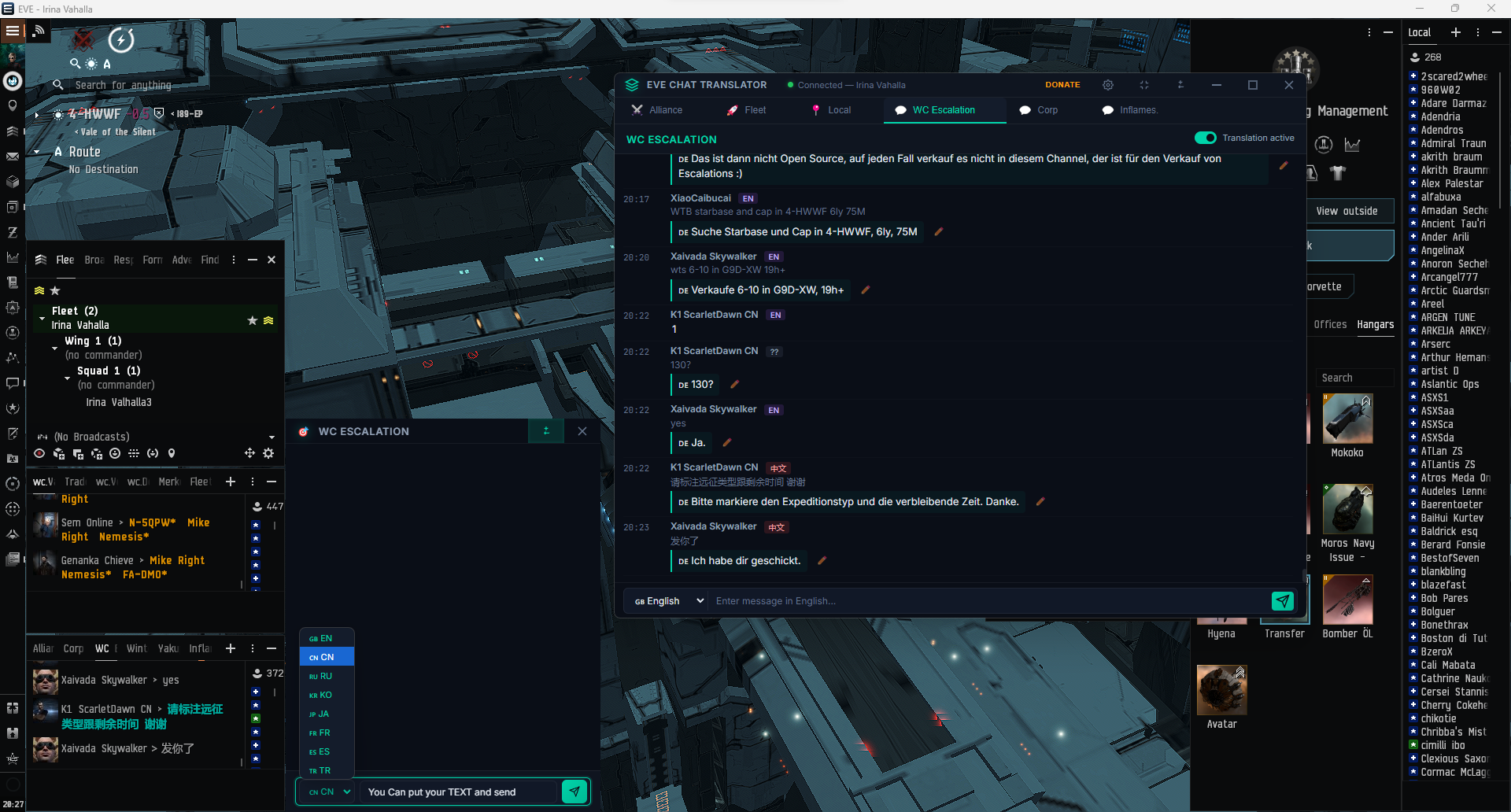
EVE Chat Translator running alongside EVE Online
EVE Chat Translator translating WC Escalation channel in real-time while playing EVE Online
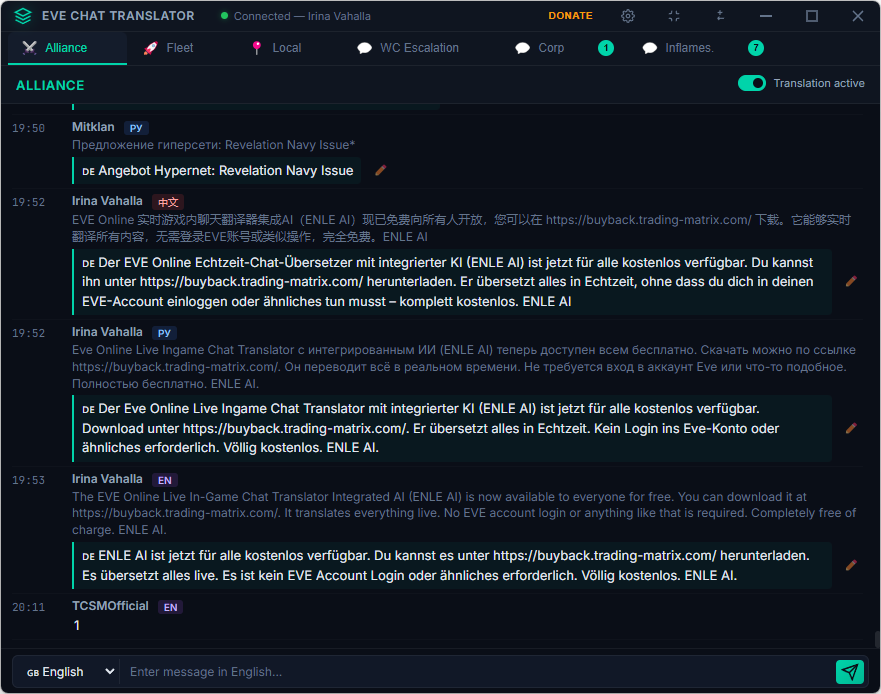
Chat Translation View
Real-time translations from Chinese, Russian & English in the Alliance channel
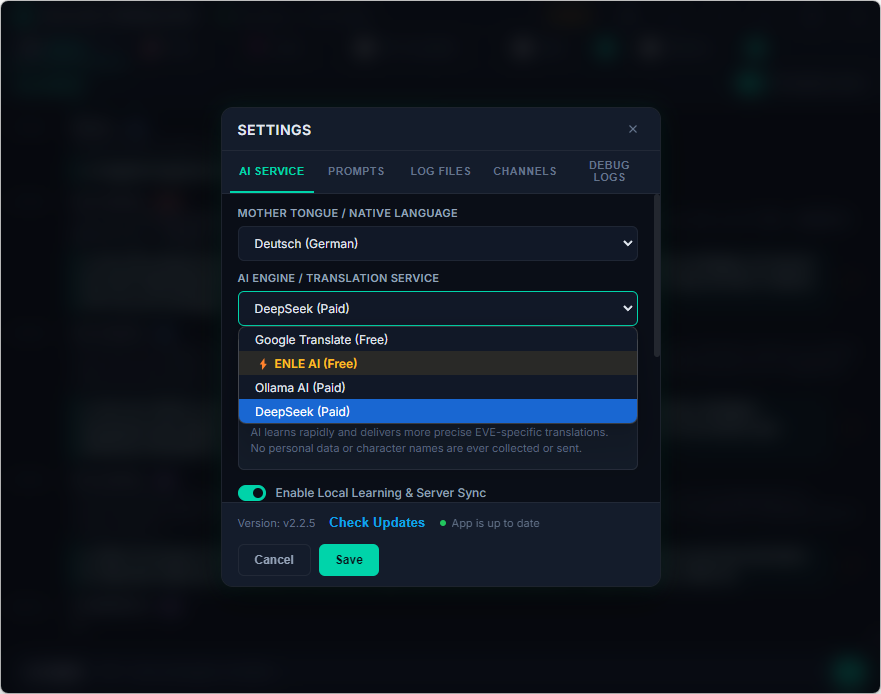
AI Engine Settings
Choose between 4 AI engines — ENLE AI + Ollama highlighted as the recommended option
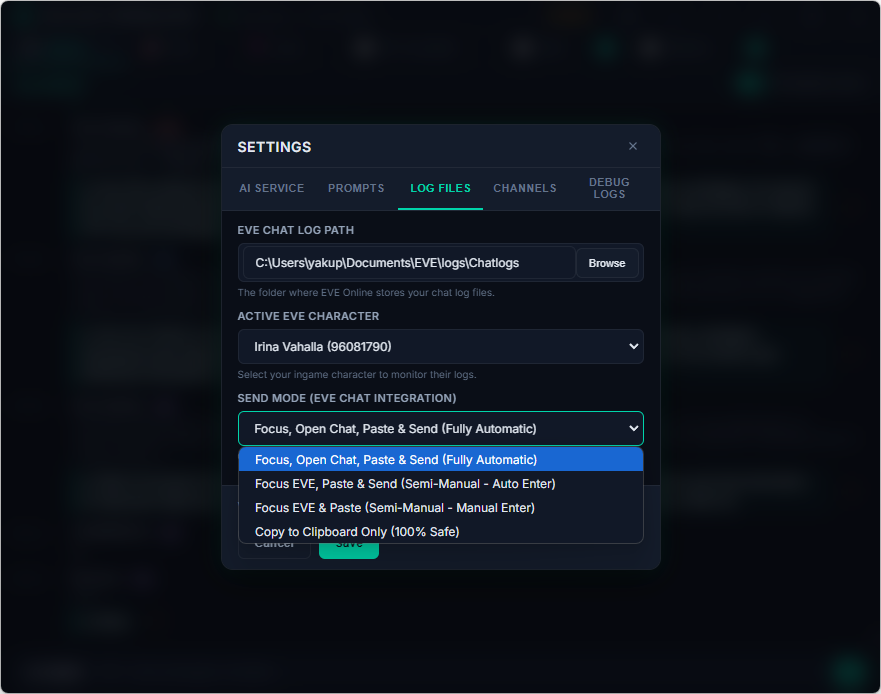
Log File Settings
Configure log path, select your EVE character, and choose the send mode
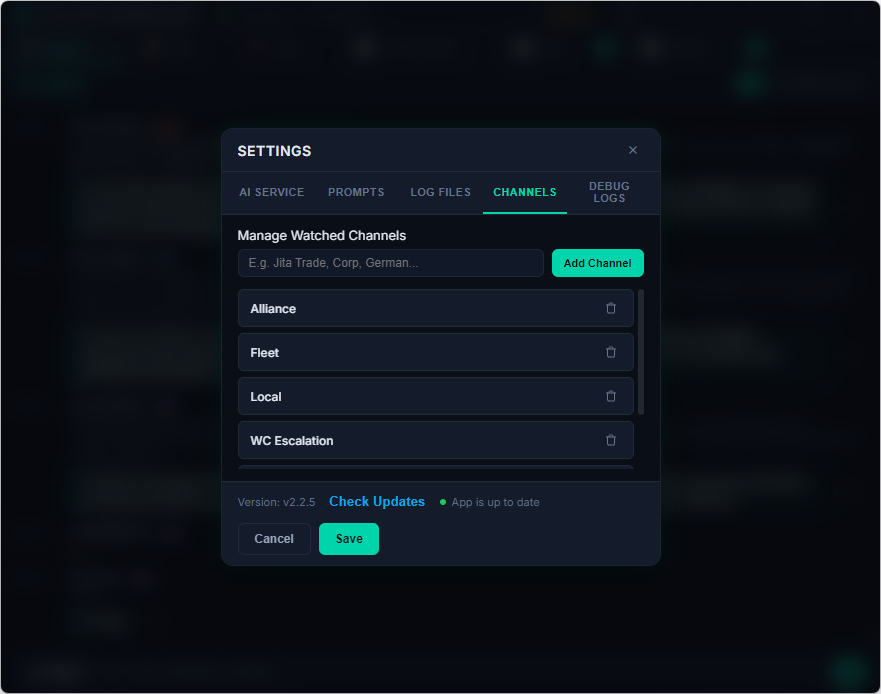
Channel Management
Manage which EVE chat channels the translator watches and translates

Installation Guide

Step-by-step instructions to get you translating in under 2 minutes.

1

Download the Installer

Click the Download button on this page to get the latest version 4.0.8 of EVE Chat Translator. Available for Windows 10/11 and Linux.

⚠ Your browser or Windows may show a security warning because the app is not yet code-signed. This is normal for free software — click "Keep" in your browser and "Run anyway" in Windows SmartScreen.
2

Run the Installer

Double-click the downloaded installer. The setup will guide you through the process:

  • Choose your installation directory (default is fine)
  • Optional: Create shortcuts for easy launching
  • Click "Install" — the process takes about 30 seconds
3

Launch & Configure

After installation, the app starts automatically. On first launch:

  • The app detects your EVE chat log folder automatically
  • Select your active EVE character from the dropdown
  • Choose your native language (e.g., German, English, Russian, Chinese)
  • Select an AI engine⚡ ENLE AI + Ollama is active by default
4

Add Chat Channels

Go to Settings → Channels and add the EVE chat channels you want to translate:

  • Type the channel name (e.g., Alliance, Fleet, Local)
  • Click "Add Channel"
  • The translator will now watch these channels for new messages
💡 Make sure the channel is open in EVE Online so that chat logs are being written to disk.
5

Start Playing!

That's it! Open EVE Online and play normally. Every chat message in a foreign language will be automatically translated and displayed in the translator window.

You can also draft translated messages in the translator's input field, copy them to your clipboard automatically (100% safe), and paste them directly back into EVE Online.

Video Tutorial

Watch a step-by-step walkthrough of installation and usage.

🎬

Tutorial Video Coming Soon

A detailed video guide showing the complete installation process and how to use all features of EVE Chat Translator will be available here shortly.

Translation Quality Tiers

Choose the engine tier that matches your preference — from offline local AI to cloud reasoning.

🚀

DeepSeek AI

  • ✓ Deep contextual cloud reasoning
  • ✓ High conversational fluency
  • ✓ Multi-message history awareness
  • ○ Requires user DeepSeek API key
🤖

ENLE AI (Pure Offline)

FREE · NO OLLAMA
  • ✓ Instant SQLite glossary lookup
  • ✓ Runs completely offline
  • ✓ Zero GPU / RAM overhead
  • ✓ 100% Free forever
🌐

Google Translate

FREE · CLOUD
  • ✓ Instant cloud translation
  • ✓ Automatic zero-setup fallback
  • ✓ 100+ standard languages
  • ○ Requires internet connection

Download EVE Chat Translator v4.0.8

Free forever. No ads. No tracking. Seamless auto-updates.

🪟

Windows

Windows 10 / 11 (64-Bit)

Download .exe (v4.0.8)
  • Version: 4.0.8 (~89 MB)
  • Automatic seamless updates
  • Clipboard & safe send key modes
🐧

Linux

Any distribution (.tar.gz)

Download .tar.gz
  • Size: ~85 MB
  • Extract and run directly
  • xdotool window automation

Our Partner Projects

Trading Matrix

The ultimate analysis tool for EVE Online market trading. Maximize your ISK profits with real-time data.

Visit Website ➔

EVE BuyBack

Sell your assets and loot directly at fair prices with instant ISK payout.

Visit Website ➔

Logistik Trans Corp

The safest and fastest transport service in New Eden for Highsec and Lowsec.

Visit Website ➔